
Reporting as code · a real run
Why reporting as code matters
In bino a report is a folder of text files: data, SQL and YAML. That sounds like a detail. It means a report can use what software teams have built over the last twenty years: version control, review, linting, a build step that checks, and CI.
The idea
A report is a folder
The Kestrel report has four pages. Nobody drew them in a designer. The project folder has 31 text files; it builds this report, a one-page monthly report and the chart images on our homepage. Each file does one job:
DataSource- Where the data comes from. Here a CSV file; a database works the same way. datasources/kestrel.yaml
DataSet- A SQL query that shapes the data for one chart or table. datasets/region_ytd.yaml
ChartStructure- A chart: which dataset, which scenarios to compare, which unit. components/region_chart.yaml
LayoutPage- One page: title, grid, and the components on it. pages/structure.yaml
ReportArtefact- The PDF: file name, format, and the pages in order. reports/kestrel.yaml
bino build reads the folder, runs the SQL, and renders the PDF. On a laptop that takes about one second, and a little longer for the first build in a new folder.
BINO 0.104.0
ℹ INFO build: Using template engine v1.0.0-next.29
→ Loading manifests...
✓ Validated 35 document(s) (26ms)
→ Building 1 artefact(s)...
→ Rendering kestrel...
Generated 1 artefact(s):
  • kestrel → dist/kestrel-2025.pdf (+graph)
✓ Build complete in 1.10sapiVersion: bino.bi/v1alpha1
kind: DataSet
metadata:
name: region_ytd
description: Revenue year to date (January to REPORT_MONTH) per region in kEUR
spec:
dependencies: [kestrel]
query: |
SELECT
region AS category,
CASE region WHEN 'North' THEN 1 WHEN 'South' THEN 2 WHEN 'East' THEN 3
WHEN 'West' THEN 4 WHEN 'Export' THEN 5 END AS categoryIndex,
SUM(revenue_ac) / 1000.0 AS ac1,
SUM(revenue_pl) / 1000.0 AS pl1,
SUM(revenue_py) / 1000.0 AS pp1
FROM kestrel
WHERE month(month) <= ${REPORT_MONTH:12}
GROUP BY region
ORDER BY categoryIndexapiVersion: bino.bi/v1alpha1
kind: ChartStructure
metadata:
name: region_chart
spec:
dataset: region_ytd
chartTitle: Regions against last year
level: category
order: categoryindex
scenarios: [pp1, ac1]
variances: [dac1_pp1_pos, drac1_pp1_pos]
measureUnit: kEUR
measureScale: _
unitScaling: 600
percentageScaling: 4
scale: 1.5One change
A new question is a small diff
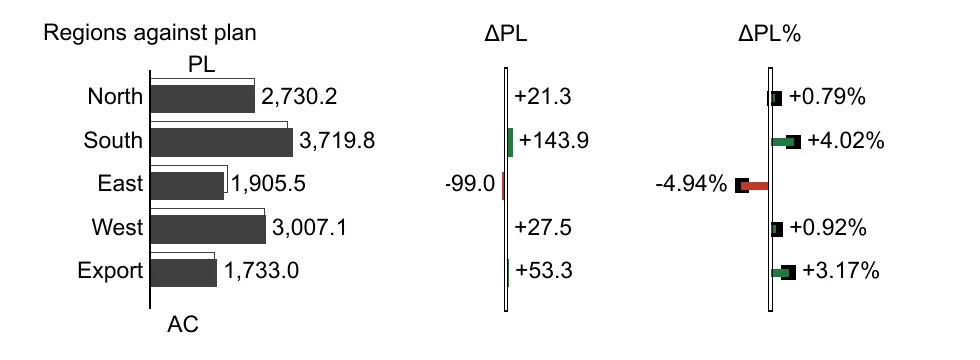
The region chart compared actual with last year. The question changed to “are we on plan?”. That is three lines in one file, and after the next build East shows up 4.94% below plan.
diff --git a/components/region_chart.yaml b/components/region_chart.yaml
index 44db548..387a9f0 100644
--- a/components/region_chart.yaml
+++ b/components/region_chart.yaml
@@ -4,11 +4,11 @@ metadata:
   name: region_chart
 spec:
   dataset: region_ytd
-  chartTitle: Regions against last year
+  chartTitle: Regions against plan
   level: category
   order: categoryindex
-  scenarios: [pp1, ac1]
-  variances: [dac1_pp1_pos, drac1_pp1_pos]
+  scenarios: [pl1, ac1]
+  variances: [dac1_pl1_pos, drac1_pl1_pos]
   measureUnit: kEUR
   measureScale: _
   unitScaling: 600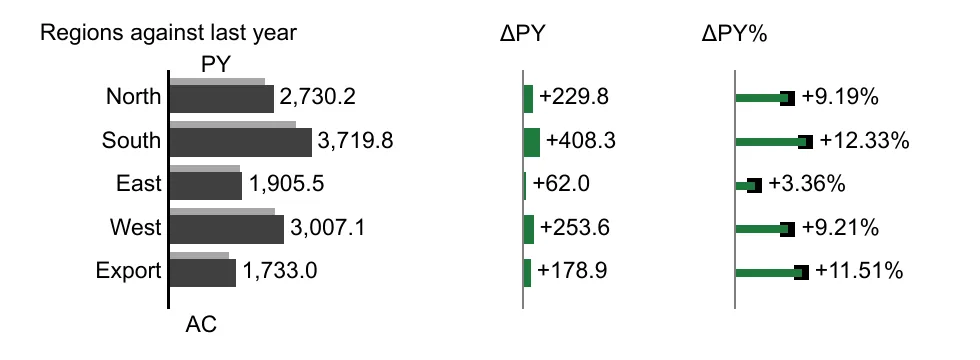
What you get
What software engineering gives a report
None of this is new. It is how software is built today. Because a bino report is text, it works for reports too. Each point below comes with the real output from the run.
Version control
Every change has an author, a time and a message. You can see how the report looked in March, compare it with today, and go back.
$ git log --format=%s
Compare regions against plan
Kestrel report
Merge requests and review
A change is proposed as a merge request. The reviewer reads the lines that changed, not a screenshot, and can comment on a single line.
Pull request #1, “Compare regions against plan”: +3 −3 in 1 file, CI green, one review comment, merged.
Linting
bino lint checks every manifest against the schema and runs lint rules. It does not run queries or render PDFs, so it is fast enough for every save and every commit.
BINO LINT 0.104.0
→ Loading manifests...
✓ Validated 35 document(s) (32ms)
→ Running lint rules...
✓ Checked 27 rule(s) (134ms)
✓ No lint warnings found in 168ms
✓ Lint complete in 169ms
A build step that checks
bino build runs every query before it renders. A broken query stops the build with a non-zero exit code, and no PDF is written.
Here one letter is too many: revenue_pln instead of revenue_pl. The error points to the line in the query and lists the columns that come close.
✗ Failed to render kestrel
bino:
✗ Runtime Error
  artefact kestrel: pipeline: execute datasets: dataset region_ytd: query: Binder Error: Referenced column "revenue_pln" not found in FROM clause!
Candidate bindings: "revenue_pl", "revenue_py", "revenue_ac", "region", "cogs_pl"
LINE 6:   SUM(revenue_pln) / 1000.0 AS pl1,
              ^^^^^^^^^^^
  → An error occurred during execution; check the logs for more details
exit code 2
CI
The same commands run on every merge request. A red check is visible before anyone merges, and a green run keeps the PDF it built as an artifact.
- passed:Install bino5 s
- passed:Lint<1 s
- passed:Build3 s
- passed:Upload the PDF1 s
- passed:Install bino6 s
- passed:Lint<1 s
- failed:Build1 s
- Upload the PDFskipped
name: Report

on:
  pull_request:
    branches: [main]
  push:
    branches: [main]

jobs:
  report:
    runs-on: ubuntu-latest
    steps:
      - uses: actions/checkout@v4

      # cli-action v1.0.0 calls flags that bino no longer has, so install bino directly
      - name: Install bino
        run: |
          curl -fsSL https://github.com/bino-bi/bino-cli-releases/releases/latest/download/install.sh -o /tmp/install-bino.sh
          bash /tmp/install-bino.sh --yes
          echo "$HOME/.local/bin" >> "$GITHUB_PATH"

      - name: Version
        run: bino version

      # bino reads every YAML file below its work dir, so the project lives in report/
      - name: Lint
        run: bino lint --work-dir report --fail-on-warnings

      - name: Build
        run: bino build --work-dir report --artefact kestrel

      - name: Upload the PDF
        uses: actions/upload-artifact@v4
        with:
          name: kestrel-report
          path: report/dist/*.pdf
Reproducible builds
With SOURCE_DATE_EPOCH set, bino writes fixed timestamps and IDs into the PDF. In this run two builds of the same files, on the same machine with the same bino version, gave the same bytes.
To build an old report again later, keep the versions fixed as well: the bino version in the CI install step, and the template engine with engine-version in bino.toml.
$ export SOURCE_DATE_EPOCH=1767225600
$ bino build --artefact kestrel && shasum -a 256 dist/kestrel-2025.pdf
409157e86382b51033d9e9a96dc94fe4e988bbf30cad747a70d590f4786dd12c  dist/kestrel-2025.pdf
$ rm -rf dist
$ bino build --artefact kestrel && shasum -a 256 dist/kestrel-2025.pdf
409157e86382b51033d9e9a96dc94fe4e988bbf30cad747a70d590f4786dd12c  dist/kestrel-2025.pdf
The limits
What the checks do not catch
Lint, build and CI find broken files. They do not know whether a number means the right thing. A chart in the wrong unit passes every check. People still read the report, and the merge request is the place for that.
In the agent run every check passed, and the first PDF still had its numbers in the wrong unit. A person found it by reading the PDF, and wrote the review in plain words.
Use cases
Where it helps
Monthly reporting
The same report every month from one set of files. The month is a variable in the SQL, so one project builds all twelve months.
Twelve builds on the homepageReports that are checked before they go out
Controlling and finance reports go through a merge request: a second person reads the change, and CI builds the PDF before it is merged.
Definitions with a history
A KPI is a SQL query in Git. Who changed the definition, when and why is in the history, next to the numbers it produced.
One style for many reports
The variance colors and widths live in one style file, and every page selects it. A change there reaches every page in the next build.
styles/kestrel.yamlReports written by agents
An agent writes text files, and bino checks them like it checks yours. The result goes through the same review as any other change.
A report written by an AI agentDelivery on a schedule
A CI job can also run on a schedule, for example on the first workday of a month, and keep or send the PDF it built.
Try it
Build the Kestrel report yourself
The project is plain CSV, SQL and YAML. Install bino, download the project, and run the same commands as in the video. The CI part ran in a private repository; its workflow, steps and logs are below.
brew install bino-bi/tap/bino-cli
bino setup

# the Kestrel project
curl -LO https://www.bino.bi/showcase/kestrel-project.zip
unzip kestrel-project.zip -d kestrel && cd kestrel
bino lint
bino build --artefact kestrel     # writes dist/kestrel-2025.pdf
report/components/region_chart.yaml· line 7Plan is the right baseline here. On page 2 East is now -4.94% against plan.