
Try report as code in a browser tab.
The sandbox runs bino behind a URL. Write the manifests on the left and see the IBCS report on the right. Upload your own CSV, and export the result as a project that runs on your laptop and in CI.
- No install
- No account to start
- Shareable by URL
- Exports a runnable project
Tutorial
One report, built step by step
The guided tutorial starts with a single text component and ends with a PDF: a page, your data, a table with variances, charts and the report artefact. Each step adds to the document of the step before, and the preview shows the result as you go.
Editor and report, side by side
On the left is a sandbox file. On the right is what the sandbox preview rendered from it, with the same engine that makes the PDF.
apiVersion: bino.bi/v1alpha1
kind: DataSource
metadata:
  name: new_cities
spec:
  type: csv
  path: https://sandbox.bino.bi/api/data/new_cities.csv
  delimiter: ";"
---
apiVersion: bino.bi/v1alpha1
kind: DataSet
metadata:
  name: revenue_by_city
spec:
  query: |-
    SELECT category, categoryIndex, operation,
           SUM(pp1) AS pp1, SUM(ac1) AS ac1
    FROM new_cities
    WHERE date = (SELECT max(date) FROM new_cities)
    GROUP BY category, categoryIndex, operation
    ORDER BY categoryIndex
  dependencies:
    - new_cities
---
apiVersion: bino.bi/v1alpha1
kind: DataSet
metadata:
  name: revenue_trend
spec:
  query: |-
    WITH monthly AS (
      SELECT CAST(date_trunc('month', CAST(date AS DATE)) AS DATE) AS month,
             SUM(pp1) AS pp1, SUM(ac1) AS ac1, SUM(fc1) AS fc1
      FROM new_cities
      WHERE date >= '2026-01-01'
      GROUP BY month
    )
    SELECT strftime(month, '%Y-%m-%d') AS date,
           'Total' AS category, 1 AS categoryIndex, '+' AS operation,
           pp1,
           CASE WHEN month <  DATE '2026-07-01' THEN ac1 END AS ac1,
           CASE WHEN month >= DATE '2026-07-01' THEN fc1 END AS fc1
    FROM monthly
    ORDER BY month
  dependencies:
    - new_cities
---
apiVersion: bino.bi/v1alpha1
kind: LayoutPage
metadata:
  name: dashboard
spec:
  pageLayout: 2x2
  titleBusinessUnit: Acme Corp
  titleMeasures:
    - name: Revenue
      unit: EUR k
  titleScenarios: AC, PY, FC
  titleDateEnd: "2026-06-30"
  titleDateFormat: month
  titleDateLink: interval
  footerText: Acme Corp - Monthly Sales Report
  children:
    - kind: ChartStructure
      metadata:
        name: region_chart
      spec:
        dataset: revenue_by_city
        scenarios:
          - ac1
          - pp1
        variances:
          - dac1_pp1_pos
        level: category
        order: ac1
        orderDirection: desc
        percentageScaling: 25
        chartTitle: Revenue by City
    - kind: ChartTime
      metadata:
        name: trend_chart
      spec:
        dataset: revenue_trend
        scenarios:
          - ac1
          - pp1
          - fc1
        level: category
        order: category
        orderDirection: asc
        dateInterval: month
        chartTitle: Monthly Revenue Trend
    - kind: Table
      metadata:
        name: region_table
      spec:
        dataset: revenue_by_city
        scenarios:
          - ac1
          - pp1
        variances:
          - dac1_pp1_pos
        type: sum
        sumTitle: Revenue by City
    - kind: Text
      metadata:
        name: summary
      spec:
        value: |
          **H1 2026 Summary**

          Total revenue reached **EUR 9.1m** year-to-date, slightly ahead of
          prior year at **+0.6%**. Madrid (**+2.1%**) and Amsterdam (**+1.8%**)
          grew fastest, while Seoul fell **-1.4%** vs PY.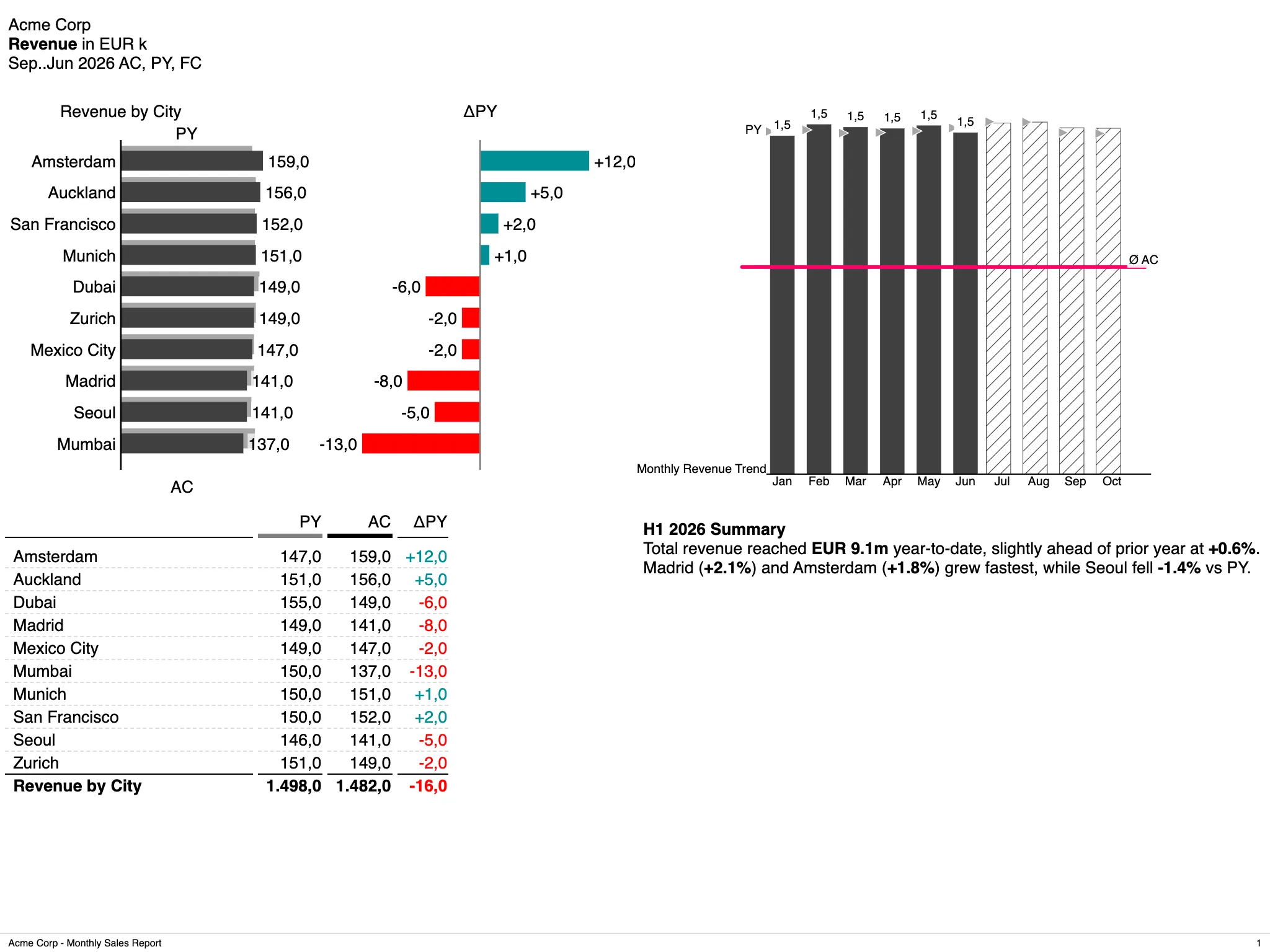
Rendered from the file on the left. It is the whole sandbox.Open the sandbox
Why it matters
Find out in an afternoon if it fits
Most reporting tools need a pilot project before you know if they fit. The sandbox needs a browser tab. What you write there is the same definition your team would put in its repository.
Test before you commit
A team can check if report as code fits its monthly close, with its own numbers, and without an install, a licence or a ticket.
Every experiment is a link
A sandbox has a URL. Send it into a review, and people see the rendered report and the definition behind it.
No dead end
Export downloads the sandbox as a bino project. What worked goes into the repository as it is. Nothing is rebuilt for production.
A guided start
New authors start with the tutorial and with templates that already render. The editor completes and checks what they type.
How it works
Write, add your data, take it with you
A sandbox is one YAML file with several documents. Everything below comes from the file shown above. bino builds the same manifests, with no sandbox-only syntax.
One file source and two queries. The first shapes the latest month by city. The second turns the year into a monthly series, where actuals switch to forecast in July:
apiVersion: bino.bi/v1alpha1
kind: DataSource
metadata:
  name: new_cities
spec:
  type: csv
  path: https://sandbox.bino.bi/api/data/new_cities.csv
  delimiter: ";"
---
apiVersion: bino.bi/v1alpha1
kind: DataSet
metadata:
  name: revenue_by_city
spec:
  query: |-
    SELECT category, categoryIndex, operation,
           SUM(pp1) AS pp1, SUM(ac1) AS ac1
    FROM new_cities
    WHERE date = (SELECT max(date) FROM new_cities)
    GROUP BY category, categoryIndex, operation
    ORDER BY categoryIndex
  dependencies:
    - new_cities
---
apiVersion: bino.bi/v1alpha1
kind: DataSet
metadata:
  name: revenue_trend
spec:
  query: |-
    WITH monthly AS (
      SELECT CAST(date_trunc('month', CAST(date AS DATE)) AS DATE) AS month,
             SUM(pp1) AS pp1, SUM(ac1) AS ac1, SUM(fc1) AS fc1
      FROM new_cities
      WHERE date >= '2026-01-01'
      GROUP BY month
    )
    SELECT strftime(month, '%Y-%m-%d') AS date,
           'Total' AS category, 1 AS categoryIndex, '+' AS operation,
           pp1,
           CASE WHEN month <  DATE '2026-07-01' THEN ac1 END AS ac1,
           CASE WHEN month >= DATE '2026-07-01' THEN fc1 END AS fc1
    FROM monthly
    ORDER BY month
  dependencies:
    - new_cities
The editor completes kind values, the spec fields of each kind, enum values, dataset references and the column names your query returns. It marks schema and lint problems while you type.
The page puts those datasets into the four panels you see above: a variance bar chart, a trend chart, a table and the written summary.
apiVersion: bino.bi/v1alpha1
kind: LayoutPage
metadata:
  name: dashboard
spec:
  pageLayout: 2x2
  titleBusinessUnit: Acme Corp
  titleMeasures:
    - name: Revenue
      unit: EUR k
  titleScenarios: AC, PY, FC
  titleDateEnd: "2026-06-30"
  titleDateFormat: month
  titleDateLink: interval
  footerText: Acme Corp - Monthly Sales Report
  children:
    - kind: ChartStructure
      metadata:
        name: region_chart
      spec:
        dataset: revenue_by_city
        scenarios:
          - ac1
          - pp1
        variances:
          - dac1_pp1_pos
        level: category
        order: ac1
        orderDirection: desc
        percentageScaling: 25
        chartTitle: Revenue by City
    - kind: ChartTime
      metadata:
        name: trend_chart
      spec:
        dataset: revenue_trend
        scenarios:
          - ac1
          - pp1
          - fc1
        level: category
        order: category
        orderDirection: asc
        dateInterval: month
        chartTitle: Monthly Revenue Trend
    - kind: Table
      metadata:
        name: region_table
      spec:
        dataset: revenue_by_city
        scenarios:
          - ac1
          - pp1
        variances:
          - dac1_pp1_pos
        type: sum
        sumTitle: Revenue by City
    - kind: Text
      metadata:
        name: summary
      spec:
        value: |
          **H1 2026 Summary**

          Total revenue reached **EUR 9.1m** year-to-date, slightly ahead of
          prior year at **+0.6%**. Madrid (**+2.1%**) and Amsterdam (**+1.8%**)
          grew fastest, while Seoul fell **-1.4%** vs PY.
Scenarios (ac1, pp1, fc1) and variances (dac1_pp1_pos) are IBCS notation, not styling. The engine decides how each one is drawn, so every report reads the same way.
Upload a CSV or Excel file, and the sandbox adds a matching DataSource and DataSet to the editor:
apiVersion: bino.bi/v1alpha1
kind: DataSource
metadata:
  name: sales_q1
spec:
  type: csv
  path: data/sales_q1.csv
---
apiVersion: bino.bi/v1alpha1
kind: DataSet
metadata:
  name: sales_q1_ds
spec:
  query: SELECT * FROM sales_q1
  dependencies:
    - sales_q1
From there it is plain SQL in bino’s embedded engine. A DataSet builder can write the query for you if you prefer to click.
Export downloads the sandbox as a bino project. Unzip it, and the same definition renders on your machine and in your pipeline:
unzip sales-dashboard.zip
cd sales-dashboard

# the same live preview, on your machine
bino preview

# and the PDF
bino build
A ReportArtefact also renders to PDF in the sandbox. Any sandbox can be embedded elsewhere as a frozen public snapshot.
What you can render
From a single chart to the finished PDF
Preview one component while you shape it. Then put it on a layout page and into a report artefact, all in the same file.
Start from a template
Blank sandbox
The minimal start: the hosted sample CSV, a DataSet and a Table.
Structure chart
Revenue by city as an IBCS bar chart with actual vs. prior-year variances.
Time series
Monthly revenue trend with actuals and a forecast for the rest of the year.
Dashboard page
A 2×2 layout with a structure chart, a trend chart, a table and commentary.
Full report (PDF)
The dashboard page in a ReportArtefact, ready to download as PDF.
Sharing & privacy
Share the link, keep the pen.
Your browser holds the right to edit a sandbox. The URL does not carry it. So a shared link lets people look, not overwrite.
Sharing a link
- The share URL never contains the edit token. People who open it get a read-only view.
- Anyone can fork a sandbox into their own copy and edit that. The original stays as it is.
- Snapshots save a state that you can restore or fork later.
- Embed snippets are public, frozen snapshots. They do not follow later edits.
Keeping it to yourself
- A sandbox shows up in the public Explore list only when you put it there.
- With an account, you can mark a sandbox as private, visible only to you.
- Accounts are optional and have no password: you sign in with a code sent by email.
- A private sandbox is shared with a short-lived read link, not a permanent public URL.
Running it
Public, or for your organisation
The public sandbox is free. If your teams should try bino on internal numbers, we can run a sandbox for your organisation, or help you run one in your own network.
Public sandbox
sandbox.bino.bi: open a tab and start writing.
- No account to start
- Guided tutorial and templates
- CSV and Excel upload
- PDF export and project download
Hosted for you
A separate sandbox for your organisation, run by us.
- Your teams try bino on internal data in their own instance
- Accounts and private sandboxes
- Your private registry packages in the editor
- Hosting in the EU
In your network
The sandbox in your own data centre or VPC.
- Runs next to your data, inside your network
- You choose which bino versions your teams can select
- Confidential figures never leave your network
- Help with the deployment
Technical detail
What your architects will ask
What the editor does, how the sandbox renders, and what it keeps private. You can check each point in the sandbox itself.
The editor
- Completion for
kindvalues, thespecfields of each kind, enum values, dataset and datasource references, and dataset column names. - Schema and lint problems are marked while you type.
- Both come from bino’s own language server, the same one the VS Code extension uses.
- Engine errors show up in a console pane instead of a blank preview.
- Switch the report language to see the output in another locale.
Rendering
- Each active sandbox runs its own
bino preview. - The preview uses the same engine and templates as
bino build. - Single components and full outputs: Table, ChartStructure, ChartTime, Text, Tree, Grid, Image, LayoutPage, DocumentArtefact, ReportArtefact.
- A ReportArtefact builds a real PDF, with the same engine as
bino build.
Data
- Upload a CSV or Excel file, and a matching
DataSourceandDataSetare written into the editor. - Excel uploads carry the sheet name into the manifest.
- Queries are plain SQL in bino’s embedded engine.
- A DataSet builder can write the SQL step by step and keeps a log of what it did.
- A hosted sample dataset is available in every sandbox, so a blank start still renders.
Isolation
- Every render runs in its own container with memory and CPU limits.
- A session that goes idle is stopped, so nothing keeps running after you leave.
- Under heavy load a new preview is refused with a clear error instead of slowing down everyone.
Sharing & persistence
- Sandboxes live at a stable URL and survive a closed tab.
- Edit access is a token created when you create or fork a sandbox. It stays in your browser and is never part of the share URL.
- Snapshots can be restored or forked later.
- Embed snippets are public, frozen snapshots and do not follow later edits.
Registry & versions
- Search the public registry from the editor and add packages as dependencies, with real
bino registryruns. - Installed packages behave like local documents, as in a checked-out project.
- Pick the bino version that renders a sandbox, from the list the deployment allows.
- The list shows the engine version of each release, so you can reproduce an older render.
Documentation
From the sandbox to a real project
What you write in the sandbox is a normal bino project, and the docs cover it.
Key ideas
What a manifest is, how documents relate, and why reports are defined as code.
Your first report
The guided path from an empty folder to a rendered PDF.
bino preview
The live preview of the sandbox, on your own machine.
Data from CSV and Excel
File data sources, sheets, delimiters and typed columns.
The data model
DataSource, DataSet, and how scenarios and variances are written.
ChartStructure reference
Every field of the chart in the example above, with its defaults.
Where it fits
A sandbox for your organisation?
Tell us which teams should try bino and on what data. We will show you the options: hosted by us, or in your own network.